or
0 answers
203 views
Hi,
We recently upgrade kendo-dropdown to 7.0 version from 5.0 version. After the upgrade we see an issue with the kendo-combo box .
We have to tab twice in the kendo combo box to move to the next input.
From developers tool I see that it is removing the k-focus class from the kendo-combobox, but still the focus remains in the combo box .
While searching the web I came across this bug below. IS there a resolution to this issue?
Any insight into this is greatly appreciated.
Tab problem Combobox · Issue #189 · telerik/kendo-angular · GitHub
Jan 17, 2017 ... Plunkr: http://plnkr.co/edit/G47seNBR8WEaMfEh4CWt?p=preview Have to press Tab twice to focus the next Combobox.



0 answers
370 views
I have configured my Kendo Grid to use a column menu and it "works" except for not rendering the SVG Icon for k-i-more-vertical.
Here's the component template:
<kendo-grid gridDataBinding [selectable]="selectableSettings" [pageSize]="10" [pageable]="pagerSettings"
    [columnMenu]="columnMenuSettings"
    #grid >
    <kendo-grid-column field="id" title="D" [class]="'k-text-center'" ></kendo-grid-column>
    <!-- rest of columns -->
    <kendo-grid-command-column title="Actions">
        <ng-template kendoGridCellTemplate let-dataItem>
            <button kendoButton icon="plus" class="k-primary" (click)="onDoSomething()">Do Something</button>
        </ng-template>
    </kendo-grid-command-column>
    <ng-template kendoGridNoRecordsTemplate>No records found</ng-template>
</kendo-grid>
Here's the relevant part of the component:
@Component({
selector: 'my-grid',
templateUrl: './grid.component.html',
styleUrls: ['./grid.component.css'],
})
exportclass GridComponent implements OnInit {
public columnMenuSettings : ColumnMenuSettings;
constructor() {
this.columnMenuSettings = {
filter: true,
sort: true,
};
}
// etc. Data binding. Event handlers. Etc.
}
Here's a grab of what's rendered. Note there's a section for the menu, but no icon. Clicking here does display the menu. Looking at this in dev tools almost looked like the next column was covering something up.
Here's what I've tried to troubleshoot:
- Upgraded all installed Kendo components to newest version via npm
- Installed both IconsModule and SvgIconsMenu (and ensured it's exported in the module)
- Put in a <kendo-icon icon="more-vertical"></kendo-icon> to ensure the graphic was installed. It was.
Help would be greatly appreciated.
2 answers
1.1K+ views
I want to create the tree with expanded static first level node.
I have an array with one object defined manually like: [{text: 'All Items', level: 0, link: '...', count: 0, items: [] }].
On ngOnInit I received data from Selector (async data source) and placed it to items[] for second level, refreshed count.
After that I want to load next levels data from another Selectors (async data source).
my function getChildren looks like:
if (expandedLevel === 0) => return array of items from manually created root node.
else => return (async data) from endpoint according needed level.
But I can't to expand the first level programmatically via [expandedKeys]="['All Items']" and [expandBy]="'text'"
Can you help me please.
Regards.

1 answer
235 views
Hi there, I'm hoping that someone might be able to help me - at present we are utilising the default kendo UI for angular in our project.
However, I need to try and overwrite one specific component (the panelbar header and its selected styles).
I do not want this overwrite to affect other UI elements of the same kind - at present I have a local component file, a HTML file with the panelbar within and a SCSS attached to affect its styling. However, no amount of targeting is letting me overwrite the styles of the panel bar.
Ideally I just need the background to be transparent and text to be grey.
local.HTML
<div class="panelbar-wrapper">
    <kendo-panelbar>
        <kendo-panelbar-item
        title="Record Control & Reply Bits" [expanded]="true">
            <ng-template kendoPanelBarContent>

</ng-template>
</kendo-panelbar-item>
</kendo-panelbar>
</div>
local.SCSS File:
.k-panelbar .k-panelbar-item.k-panelbar-header.k-level-0 .k-link.k-selected{

         background-image: none !important;
         color: #303030 !important;
         background: transparent !important;

}
    .k-panelbar .k-panelbar-item.k-panelbar-header.k-level-0 .k-link{
        color: #303030 !important;

}
Any help would be really appreciated.

1 answer
228 views
kendo-chart-series-item converting the value from 1000 to 1k. Is there anything which can help by which I can save my time.and also I don't have to write the function for achieving this.

Martin Bechev
Telerik team

answered
on
28 Dec 2022
0 answers
98 views
Hi,
I'm using kendo but have an issue as follows:
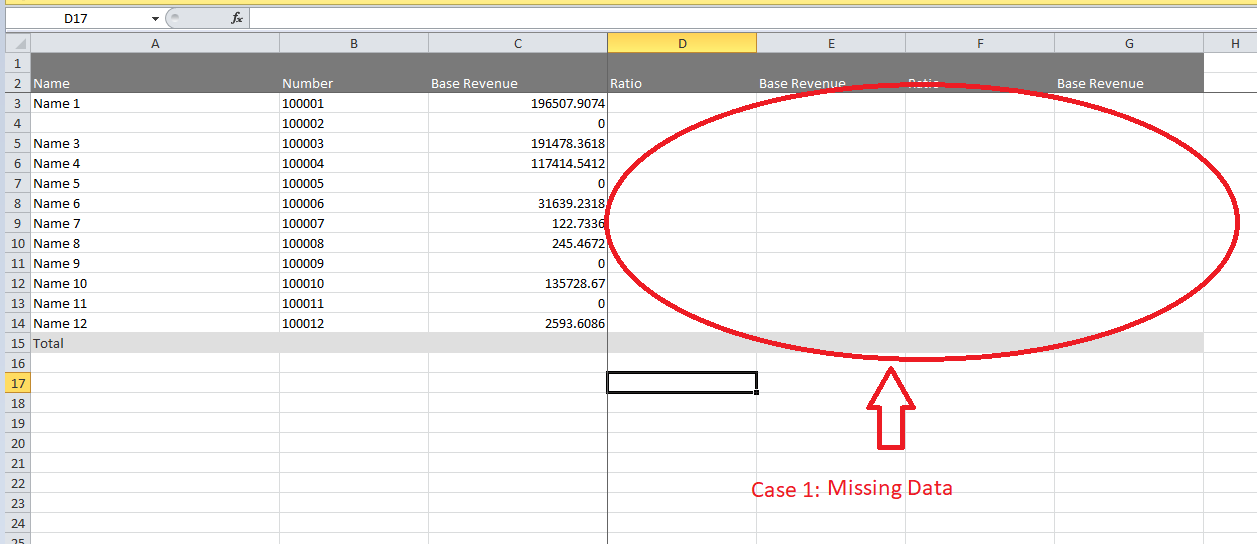
Case 1: The old source can be edited, but the excel is missing data
https://stackblitz.com/edit/angular-v6xzlw-cs7bsp?file=src%2Fapp%2Fapp.component.ts
Case 2: New source can't edit but export excel enough data
https://stackblitz.com/edit/angular-v6xzlw-fpo6xw?file=src%2Fapp%2Fapp.component.ts
Expect: Both can be edited and exported
Anyone who has encountered this case, please support me.
Thanks, all.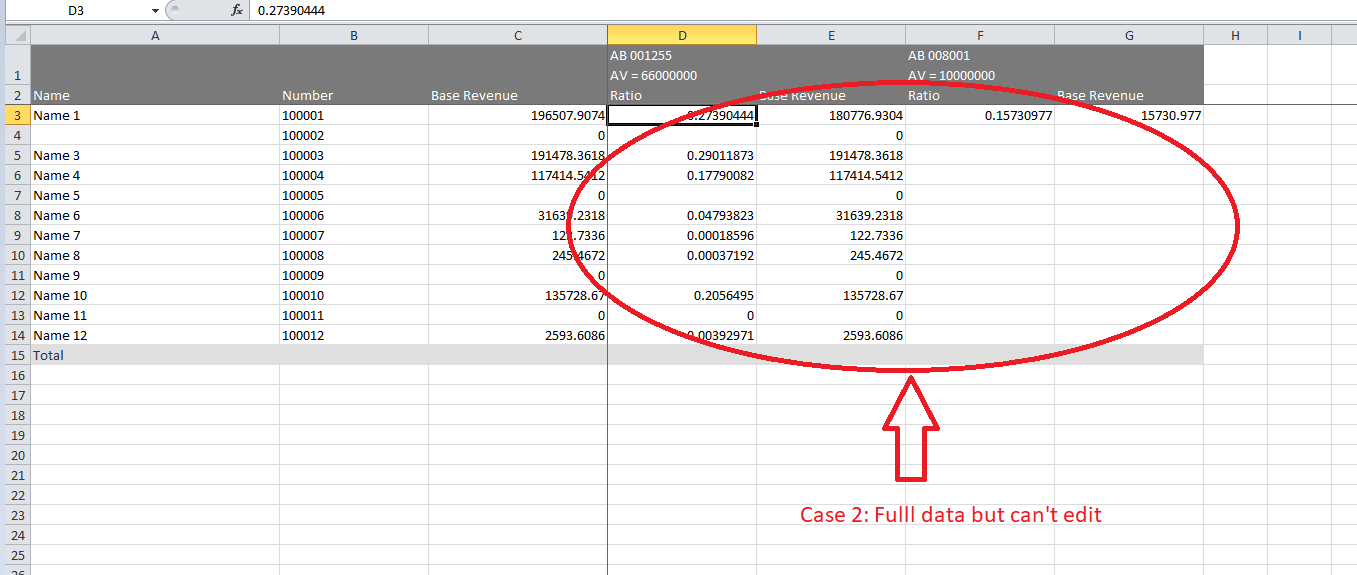


I'm using kendo but have an issue as follows:
Case 1: The old source can be edited, but the excel is missing data
https://stackblitz.com/edit/angular-v6xzlw-cs7bsp?file=src%2Fapp%2Fapp.component.ts
Case 2: New source can't edit but export excel enough data
https://stackblitz.com/edit/angular-v6xzlw-fpo6xw?file=src%2Fapp%2Fapp.component.ts
Expect: Both can be edited and exported
Anyone who has encountered this case, please support me.
Thanks, all.

Caesar
Top achievements
 Rank 1
Rank 1
asked
on
28 Dec 2022
1 answer
97 views
Can I set an end time for the weekly schedule view?
In one of the projects I'm working on, I need to set these parameters because shifts in the calendar start and end are non-standard.
As an example: Set the day start and end time to 6:00 am every day from 25/12/2022 to 31/12/2022.
This is what I am trying to do, but it doesn't work.
Martin Bechev
Telerik team
answered
on
26 Dec 2022
1 answer
634 views
This is generated with this code snippet:
            <kendo-multiselect
              [checkboxes]="true"
              [autoClose]="false"
              [data]="listItems"
              [clearButton]="false"
              formControlName="referenceType"
              #multiselect
              [style.width.px]="350"
              textField="name"
              valueField="id"
              [itemDisabled]="itemDisabled"
            >
            </kendo-multiselect>
I'd like to remove the X clear icon. Is this possible?
Martin Bechev
Telerik team
answered
on
26 Dec 2022
0 answers
107 views
Hello
I have a grid cell with filter set to menu. So the popup appears with the list of default operators that are needed to be included in the popup.
Something like below:
<ng-template
kendoGridFilterMenuTemplate
...
>
<kendo-grid-numeric-filter-menu
...
>
<kendo-filter-eq-operator> </kendo-filter-eq-operator>
<kendo-filter-neq-operator> </kendo-filter-neq-operator>
<kendo-filter-gte-operator> </kendo-filter-gte-operator>
<kendo-filter-lte-operator> </kendo-filter-lte-operator>
<kendo-filter-isnull-operator> </kendo-filter-isnull-operator>
<kendo-filter-isnotnull-operator> </kendo-filter-isnotnull-operator>
</kendo-grid-numeric-filter-menu>
</ng-template>
What i am trying to achieve is to add another operator like 'In' that can accept comma separated values.
I have looked at the doc (https://www.telerik.com/kendo-angular-ui/components/grid/filtering/filter-row/#toc-custom-filter-row-components/)
But i dont see a custom filter operator example.
Could you please let me know if its possible to do that or is there anyway i can achieve this.
Thanks
SM
1 answer
151 views
See this example:
https://stackblitz.com/edit/angular-7nulmk?file=src%2Fapp%2Fapp.component.ts,src%2Fapp%2Fapp.module.ts,package.json
- When the icon is clicked, the row in the treelist is not selected.
- When k-icon class is removed from the span, it works: selection is updated
Martin Bechev
Telerik team
answered
on
23 Dec 2022










