or
0 answers
136 views
I have a kendo-menu in the upper right corner of the window. When the menu items are pulled down, there is an ugly moment where the menu seems to be partially offscreen, the scrollbar appears and then the menu shifts back on screen and the scrollbar disappears. I was wondering if I could fix this by forcing the menu to appear onscreen. I don't see anything in the api to set the initial position.

1 answer
177 views
Hi,
I am currently trying to upgrade Kendo UI for Angular components to their latest versions (v11.0.0).
For customization, I am using the Theme Builder (https://themebuilderapp.telerik.com). When I export the configured theme, I get some zipped files, one of which is an "index.scss", in which the first line states:
// Compatible with @progress/kendo-theme-default v.5.8.0
But the latest package of "@progress/kendo-theme-default" is version 6.0.3, and the styles generated by the Theme Builder seem not to be compatible with Kendo components v11.
I tried downgrading this package to 5.12.0, but then the file upload component looks broken:
Is this a known issue?
When will the Theme Builder be compatible with the latest Kendo packages?
Thanks in advance,
Felix

Martin Bechev
Telerik team

answered
on
23 Jan 2023
0 answers
140 views
Given multiple groupings, I would like to prepend {groupField: groupValue ->} to each child grouping.
For example:
Group Result:
Supplier ID: 1
Supplier ID: 1 -> Category: Beverages
Supplier ID: 1 -> Category: Beverages -> Name: Chai
How can I retrieve the child group's parent groups, so I can prepend them to the child group's header template?
Thanks!

1 answer
656 views
Is there a way to make both the toolbar and editor and its content somehow readonly or disabled?

Veselin
Telerik team
answered
on
19 Jan 2023
0 answers
299 views
I am using kendo multi-select control on my angular application. My use case is expecting a search functionality inside the dropdown. Instead of searching over the field, the dropdown should show a search text box to search the items inside the dropdown list. Like in the kendo-dropdown-filtering, but it should be a muti-select ( see the below image.)
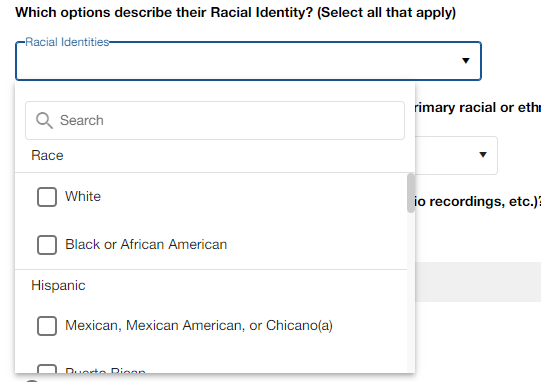
I need to filter the multi-select items while typing in the search textbox in the dropdown. This search text box is added by me.
unfortunately, I am not able to achieve this customization. Not able to clickable or type anything on the search textbox.
I need to filter the multi-select items while typing in the search textbox in the dropdown. This search text box is added by me.
unfortunately, I am not able to achieve this customization. Not able to clickable or type anything on the search textbox.
            <kendo-multiselect
              aria-label="Racial Identities"
              [checkboxes]="{ checkOnClick: true, enabled: true }"
              formControlName="RaceAndEthnicity"
              #multiselect
              [autoClose]="false"
              [fillMode]="formUiStyle.dropDownFillMode"
              [data]="raceAndEthnicityData"
              [textField]="'lovDesc'"
              [valueField]="'lovCode'"
              (valueChange)="RaceAndEthnicityhange($event)"
              [popupSettings]="{
                popupClass: popupClassMultiSelect,
                animate: true
              }"
            >
              <ng-template kendoMultiSelectHeaderTemplate let-dataItem>
                <div class="input-search">
                  <span
                    class="material-icons"
                    aria-label="search racial identity"
                    aria-hidden="true"
                    >search</span
                  >
                  <kendo-floatinglabel text="Search">
                    <!-- Added by me to filter the items on a search textbox. -->
                    <kendo-textbox
                      aria-label="search racial identity"
                      [fillMode]="formUiStyle.inputFillMode"
                      placeholder="Search"
                    >
                    </kendo-textbox>
                  </kendo-floatinglabel>
                </div>
              </ng-template>
              <ng-template kendoMultiSelectItemTemplate let-dataItem>
                <span class="app-checkboxwidtext-wrapper">
                  <input
                    type="checkbox"
                    kendoCheckBox
                    attr.aria-labelledby="{{dataItem.lovDesc}}"
                    [id]="dataItem.lovDesc"
                  />
                  <label class="k-checkbox-label" [for]="dataItem.lovDesc">{{
                    dataItem.lovDesc
                  }}</label>
                </span>
              </ng-template>
            </kendo-multiselect>
n/a
Top achievements
 Rank 1
Rank 1
asked
on
19 Jan 2023
1 answer
161 views
In Calendar month view, can I adjust the start day of the week?
Setting Saturday as the first day of the week is an example.
https://stackblitz.com/edit/angular-vth9pa?file=src/app/app.component.ts

Hetali
Telerik team
answered
on
19 Jan 2023
0 answers
151 views
Hello, having an issue after upgrading to Angular 15 (from Angular 6), after update the Grid to angular-kendo-grid 7.4.2, now my Grid layout is wrong on columns with nested kendo-grid-column-group, this is the code for that column:
<kendo-grid-column-group title="Body" [headerStyle]="{'background-color': '#0064A3','color': '#fff','line-height': '1em'}"><kendo-grid-column-group title="Material" [headerStyle]="{'background-color': '#0899b2','color': '#fff','line-height': '1em'}">
<kendo-grid-column class="text-center" field="bodMatShortDescription" title="ASME" width="300" [headerStyle]="{'background-color': '#0da6c1','color': '#fff','line-height': '1em'}">
<ng-template kendoGridEditTemplate
let-dataItem="dataItem"
let-column="column"
let-formGroup="formGroup">
<!--No editable field-->
</ng-template>
</kendo-grid-column>
<kendo-grid-column class="text-center" field="bodMatVMS" title="VMS" width="160" [headerStyle]="{'background-color': '#0da6c1','color': '#fff','line-height': '1em'}">
<ng-template kendoGridCellTemplate let-dataItem>
{{getEchart1051ById(dataItem.bodMatVMS_ID)}}
</ng-template>
<ng-template kendoGridEditTemplate
let-dataItem="dataItem"
let-column="column"
let-formGroup="formGroup">
<kendo-dropdownlist [data]="echart1051Data_Active"
[textField]="'vms'"
[valueField]="'id'"
[valuePrimitive]="true"
[formControl]="formGroup.get('bodMatVMS_ID')">
</kendo-dropdownlist>
</ng-template>
</kendo-grid-column>
<kendo-grid-column class="text-center" field="bodMatMCS" title="MCS" width="160" [headerStyle]="{'background-color': '#0da6c1','color': '#fff','line-height': '1em'}">
<ng-template kendoGridCellTemplate let-dataItem>
{{getEchart1056ById(dataItem.bodMatMCS_ID)}}
</ng-template>
<ng-template kendoGridEditTemplate
let-dataItem="dataItem"
let-column="column"
let-formGroup="formGroup">
<kendo-dropdownlist [data]="echart1056Data_Active"
[textField]="'mcs'"
[valueField]="'id'"
[valuePrimitive]="true"
[formControl]="formGroup.get('bodMatMCS_ID')">
</kendo-dropdownlist>
</ng-template>
</kendo-grid-column>
</kendo-grid-column-group>
</kendo-grid-column-group>
I attached image below, column-group Body should be same length as column Material but is incorrect after the upgrade, any ideas why is happening? Thanks.
1 answer
178 views
./src/styles.scss - Error: Module build failed (from ./node_modules/sass-loader/dist/cjs.js):
SassError: Index out of range
╷
820 │ @return function-exists( $name );
│ ^^^^^^^^^^^^^^^^^^^^^^^^
╵
@progress\kendo-theme-material\dist\all.scss 820:13 k-meta-function-exists()
@progress\kendo-theme-material\dist\all.scss 6489:19 generate-utils()
@progress\kendo-theme-material\dist\all.scss 6577:1 @import
src\styles.scss 9:9 root stylesheet
I get the above output when I upgraded to version 6 of the material theme. It builds successfully with version 5.x.x

Yanmario
Telerik team
answered
on
17 Jan 2023
1 answer
171 views
Can we achieve the same functionalites of date in the kendo chart.
The first pic(Apex chart(pic 1).) is from apex chart in which we can get the data arranged in a proper format,and when the dates increase the apex chart gives all the dates arranging it in proper manner.for example when it has 30 dates for that it gives the dates arranged in 12 colums.
and when click on year it gives 12 months with all the data arranged in proper format of 12 colums(months).
how can I achieve this in kendo chart
Slavena
Telerik team
answered
on
17 Jan 2023
3 answers
360 views
Hi, I'm facing with a problem when trying to use DialogService in a module less application with Angular 15
I've created a sample application to ilustrate the problem. Is based on the official documentation located at:
https://www.telerik.com/kendo-angular-ui/components/dialogs/dialog/service/#toc-content-template
When I launch the app the button doesn't appear and a console error is thrown about BrowserModule
Here is a screenshot with that error.
Thanks in advance!












