or
1 answer
141 views
Hi
When we plot an area series on the same chart as a line series we find that the area series no longer fills the full width of the chart, as shown below. Here is a REPL with the code to reproduce it.
Is there a way to restore the behaviour of the area series, like this?
Thank you
Mark

Hristian Stefanov
Telerik team

answered
on
22 Dec 2023
1 answer
150 views
Is it possible to disable the movement to the next row when a user uses the enter key to edit a field with in-cell editing?
I looked through the forums but only found an old thread regarding a WinForms property for an EnterKeyMode. This would be a great addition to the Blazor controls.
1 answer
196 views
We are start using Blazor in a major redevelopment of our Angular App.
We are looking at the Drawer to create a side navigation component that will display Hierarchical data.
At the moment with just two levels the description of the items is clipped and shows the three dots at the end e.g. "Financial Comparis..."
How do I resize the drawer sidebar width to more than the default 240px so that text is not clipped and ends with ....?
We are looking at the Drawer to create a side navigation component that will display Hierarchical data.
At the moment with just two levels the description of the items is clipped and shows the three dots at the end e.g. "Financial Comparis..."
How do I resize the drawer sidebar width to more than the default 240px so that text is not clipped and ends with ....?
Hristian Stefanov
Telerik team
answered
on
20 Dec 2023
1 answer
323 views
I have recently downloaded the latest Telerik.UI for blazor 5.0.1 commercial and I tried converting a dotnet 8 project to a telerik project using the context menu.
Is there a plan to have support for the new .NET 8 project templates?
The option to also create a new blazor project from the Visual Studio 2022 project templates is gone. I cannot create a blazor project.
I saw the "Discover the Magic of .NET 8 and Beyond!" webinar and it seemed support for .NET 8 was ready

Momchil
Telerik team
answered
on
20 Dec 2023
1 answer
738 views
How would I create a custom reusable component using Blazor Grid? I have the following that I'd like to create a component from:
<TelerikGrid Data="@InitialLendersData"
EditMode="@GridEditMode.Incell"
SelectionMode="@GridSelectionMode.Multiple"
@bind-SelectedItems="@SelectedInitialLenders"
Height="250px"
Width="640px"
OnEdit="@EditInitialLendersHandler"
OnUpdate="@UpdateInitialLendersHandler">
<GridColumns>
<GridColumn Field="@nameof(Lender.IsSelected)" Title="" Width="50px" TextAlign="@ColumnTextAlign.Center" Editable="false">
<Template>
@{
EditedLender = context as Lender;
<TelerikCheckBox @bind-Value="@EditedLender.IsSelected" OnChange="@ChangeSelectedHandler" />
}
</Template>
</GridColumn>
<GridColumn Field="@nameof(Lender.Name)" Editable="false" />
<GridColumn Field="@nameof(Lender.Amount)" Width="160px" DisplayFormat="{0:C2}" TextAlign="@ColumnTextAlign.Right">
<EditorTemplate>
@{
var item = context as Lender;
<TelerikNumericTextBox @bind-Value="@item.Amount" DebounceDelay="0" Min=0 Max=999999999999 Arrows="false" Format="C2" Decimals="2"></TelerikNumericTextBox>
}
</EditorTemplate>
</GridColumn>
</GridColumns>
</TelerikGrid>
How do I pass in the data (InitialLendersData & SelectedInitialLenders) and references to the events (EditInitialLendersHandler, UpdateInitialLendersHandler & ChangeSelectedHandler) from the custom component? Is this possible?
<TelerikGrid Data="@InitialLendersData"
EditMode="@GridEditMode.Incell"
SelectionMode="@GridSelectionMode.Multiple"
@bind-SelectedItems="@SelectedInitialLenders"
Height="250px"
Width="640px"
OnEdit="@EditInitialLendersHandler"
OnUpdate="@UpdateInitialLendersHandler">
<GridColumns>
<GridColumn Field="@nameof(Lender.IsSelected)" Title="" Width="50px" TextAlign="@ColumnTextAlign.Center" Editable="false">
<Template>
@{
EditedLender = context as Lender;
<TelerikCheckBox @bind-Value="@EditedLender.IsSelected" OnChange="@ChangeSelectedHandler" />
}
</Template>
</GridColumn>
<GridColumn Field="@nameof(Lender.Name)" Editable="false" />
<GridColumn Field="@nameof(Lender.Amount)" Width="160px" DisplayFormat="{0:C2}" TextAlign="@ColumnTextAlign.Right">
<EditorTemplate>
@{
var item = context as Lender;
<TelerikNumericTextBox @bind-Value="@item.Amount" DebounceDelay="0" Min=0 Max=999999999999 Arrows="false" Format="C2" Decimals="2"></TelerikNumericTextBox>
}
</EditorTemplate>
</GridColumn>
</GridColumns>
</TelerikGrid>
How do I pass in the data (InitialLendersData & SelectedInitialLenders) and references to the events (EditInitialLendersHandler, UpdateInitialLendersHandler & ChangeSelectedHandler) from the custom component? Is this possible?

1 answer
279 views
Is there any way to add your own columns to the list view of the file manager in addition to the default columns, or are you limited to the default columns of name, date created and file size?
In general, how easy is it to customize the appearance and data displayed? Is it easy to extend the component with custom behavior?
Hristian Stefanov
Telerik team
answered
on
19 Dec 2023
4 answers
430 views
i would like to make separate control telerik form to update the grid. How to associate this new control with a grid?
regards,
Djole




4 answers
492 views
Hi,
I use a TelerikGrid relying on FluentValidator.
Validation works fine when users manually edit a grid value.
But I do not manage to trigger it after the grid loads (so users can view possible incorrect values after DB loading).
I have tried 2 different ways, both without success.
1) using validation at Grid level.
Well I basically replicated your demo:
https://docs.telerik.com/blazor-ui/components/grid/editing/validation
2) using a TelerikForm inside the (only cell) that needs to be validated.
Something like this:
<TelerikGrid @ref="@_gridRef"
                 TItem="MyDto"
                 Data="@MyItems">

   <GridSettings>
     <GridValidationSettings>
       <ValidatorTemplate>
         <FluentValidationValidator Validator=@_validator />
       </ValidatorTemplate>
     </GridValidationSettings>
   </GridSettings>


 <GridColumns>

[...]

  <GridColumn Field="@nameof(MyDto.MyProp)" Title="My Prop"Context="ctx">
    <Template>
      <EditForm Model="@ctx">
        <FluentValidationValidator Validator=@_validator/>
        <TelerikTextBox @bind-Value="@((ctx as MyDto).MyProp)"/>
      </EditForm>
    </Template>
  </GridColumn>
</GridColumns>
</TelerikGrid>
In both cases, the Textbox turns red if the users types an incorrect value.
But it does not if the grid load an incorrect value from the DB and display it.
Any suggestion to make this work?
1 answer
256 views
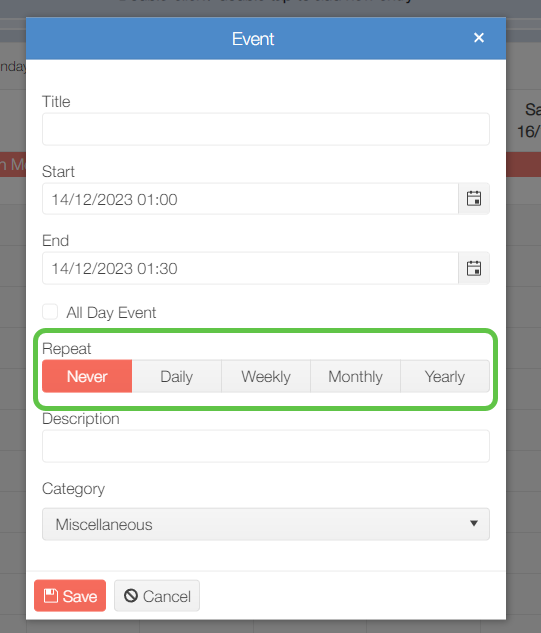
Is there any way to dynamically hide the Repeat options on the Add Event dialog? We have a scenario where some users should be able to create recurring appointments, but other users should be restricted to creating "one-off" appointments only.
Georgi
Telerik team
answered
on
18 Dec 2023
1 answer
416 views
Hello!
I am using Telerik.UI.for.Blazor version 5.0.0.,
I have a page with a treelist. I want all items to be collapsed when the page is loaded and the treelist is displayed for the first time.
How do I do this?
Georgi
Telerik team
answered
on
18 Dec 2023











