or
2 answers
148 views
I have a Grid Popup Edit Form that contains another component.
The popup has a line across the bottom that seems to be a footer of some sort. I would like to remove that line but am not able to find a setting to do so. My fall back would be to use CSS but I was wondering if there is a setting or other way to remove it?

Justin
Telerik team

answered
on
22 Aug 2024
0 answers
360 views
We recently updated to Telerik.UI.for.Blazor 6.0.0 and now none of the forms on our website will submit using the "Enter" key on the keyboard. You must now either click or tab to the button and then hit enter.
This was not an issue with the previous version that we had pulled in.
Is there a fix for this or a new implementation pattern that needs to be used to support this?




1 answer
481 views
I'm creating a drop-down list control that can accept different style sheets to control the font sizes in the control. I have everything working except the drop-down list items. This control could appear on a page more than once, and the controls could be defined with different classes. The styles need to be limited to the scope of the defined CSS.
This is how it looks.
So, the display is working. HOWEVER, I can't seem to limit the styling of the drop-down.
Here is the example of one of the style:
<style>
/* reduce default 14px font-size */
.k-button.ReportSelectionText08,
.k-input.ReportSelectionText08,
.k-input.ReportSelectionText08 .k-input-inner.ReportSelectionText08,
.k-picker.ReportSelectionText08,
.k-picker.ReportSelectionText08 .k-input-inner.ReportSelectionText08 {
font-size: 8px;
}
/* reduce default 4px/8px paddings */
.k-button.ReportSelectionText08,
.k-picker.ReportSelectionText08 .k-input-inner.ReportSelectionText08,
.k-input.ReportSelectionText08 .k-input-inner.ReportSelectionText08,
.k-button.k-input-button.ReportSelectionText08 {
padding: 2px 4px;
}
/* remove default 20px min-height */
.k-button.k-input-button.ReportSelectionText08 .k-button-icon.ReportSelectionText08 {
min-height: initial;
}
/* styles for the dropdown items */
.k-animation-container .k-list .k-list-item {
font-size: 8px;
padding: 2px 4px;
}
</style>
The problem is this line:
/* styles for the dropdown items */
.k-animation-container .k-list .k-list-item {
font-size: 8px;
padding: 2px 4px;
}
This seems to control every control on the page, all of the drop-down item lists will be font size 8.
If I try to limit it, like the other example like this :
/* styles for the dropdown items */
.k-animation-container.ReportSelectionText08 .k-list.ReportSelectionText08 .k-list-item.ReportSelectionText08 {
font-size: 8px;
padding: 2px 4px;
}
It doesn't work. How can I limit the formatting of the drop-down items to be non-global?

Tsvetomir
Telerik team
answered
on
22 Aug 2024
1 answer
113 views
How to code for such a range slider with area chart (picture link given). Unable to find any code example for such a view of the slider.
Desired View of Range Slider with area chart
Just like the one shown in this full view image (On this Telerik Page)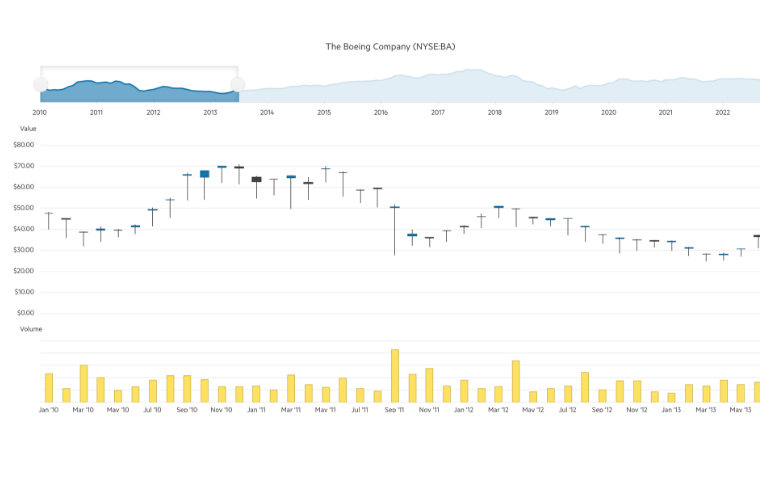
Nansi
Telerik team
answered
on
22 Aug 2024
1 answer
121 views
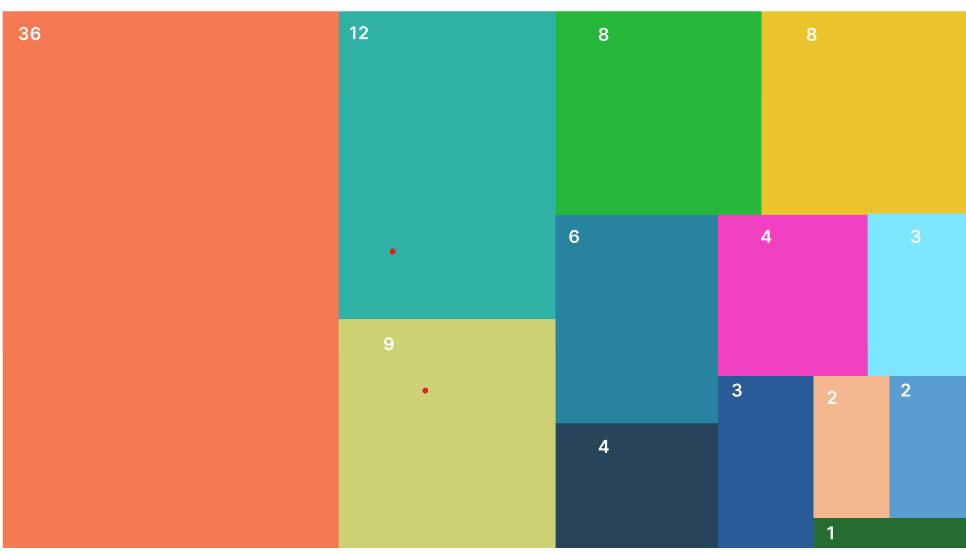
I want to create this chart in Blazor UI but can't seem to find it anywhere.
Tsvetomir
Telerik team
answered
on
22 Aug 2024
1 answer
117 views
Please see the following minimal reproducible example:
https://blazorrepl.telerik.com/GeYMbZQk22cmnlsN33
When adding a new record and editing `Field1`, the validation tooltip and k-invalid styling appear if the user is entering any value that triggers the custom ValidationAttribute. If the user presses enter, the validation correctly prevents a new record from being created. However, k-invalid styling is replaced with k-valid styling, and the validation tooltip disappears.
How can the k-invalid styling and validation tooltip persist when the user presses enter with an invalid input?
https://blazorrepl.telerik.com/GeYMbZQk22cmnlsN33
When adding a new record and editing `Field1`, the validation tooltip and k-invalid styling appear if the user is entering any value that triggers the custom ValidationAttribute. If the user presses enter, the validation correctly prevents a new record from being created. However, k-invalid styling is replaced with k-valid styling, and the validation tooltip disappears.
How can the k-invalid styling and validation tooltip persist when the user presses enter with an invalid input?

Hristian Stefanov
Telerik team
answered
on
21 Aug 2024
1 answer
414 views
Hi Telerik,
I'm new to Blazor and I'm encountering an issue with the TelerikGrid component. Here's my problem:
1. I have a TelerikGrid inside a parent container with a max-height style.
2. I've set the Height property of the TelerikGrid to 100%.
3. The grid doesn't seem to conform to the max-height of its parent container.
4. It only works correctly when I set a fixed height on the parent, rather than using max-height.
Is this expected behavior, or could it be a bug? If it's not a bug, how can I make the TelerikGrid respect its parent's max-height? Here's a simplified version of my setup:
https://blazorrepl.telerik.com/cyaMvtYJ27JGxNSB59
Any insights or workarounds would be greatly appreciated. Thanks in advance!
Marcel
Hristian Stefanov
Telerik team
answered
on
19 Aug 2024
1 answer
152 views
I have a wizard that on the first page a user can toggle what all pages they want to access. It is meant to narrow down the available options to what they need. When a user turns one of the options off, I disable that page. I don't hide it because the functionality with the add/remove pages tends to put the newly added pages at the bottom of the wizard (which I don't want).
The next problem I run into is the functionality of the Previous / Next Buttons. If the next or previous page is disabled, the relative button is also disabled. Which means the user now has to click the actual step instead of clicking next.
I attempted to add my own buttons but without access to the individual steps like the default buttons have I can't determine if the steps are disabled or not. My goal is to click the "Next" or "Previous" button and determine what the next available step (if it is non-linear) is instead of forcing the user to figure out they need to click the step in the stepper section.
There is a hack to get around this, but the business logic is not ideal, and it is very rigid. I would prefer not to go this route. The work around is checking all the possible combinations of variables that control the disabled option for each page.

Dimo
Telerik team
answered
on
15 Aug 2024
1 answer
367 views
Looking to leverage the Required data annotation on the model to apply an asterisk or other required field indicator to a FormItem's label. Is there a way to apply an html attribute/class to a FormItem automatically, that could then be used to append an asterisk to its label? Trying to avoid the need of marking Required both in the model and the UI.
Dimo
Telerik team
answered
on
15 Aug 2024
1 answer
193 views
I'm trying to create filter that works on two columns. The first column "IsActive" = true works properly.
I need to have a second filter on a column that filters for all "ParticipantId" that is a nullable integer type
thatis either null or empty.
Logical this would be an And
Currently this is what I have but it does not work. How would I includea filter for a null integer column using AND logic?
var filterDescriptors = new List<IFilterDescriptor>
{
new CompositeFilterDescriptor{
FilterDescriptors =
[
new FilterDescriptor{
Member = "IsActive",
Operator = FilterOperator.IsEqualTo,
Value = true,
MemberType = typeof(bool)
},
new FilterDescriptor{
Member = "ParticipantId",
Operator = FilterOperator.IsNullOrEmpty,
Value = null,
MemberType = typeof(int)
}
]
}
};
Dimo
Telerik team
answered
on
14 Aug 2024











