or
1 answer
524 views
if I have content like this...
<div>
  {{content}}
</div>
<div kendoWindowContainer></div>
if the content on the page is large enough, then when I create the window with the angular service, it makes the page scroll down to the bottom where the windowContainer div is located. Even though the service is explicitly setting the window position to be at the top of the page.
So effectively, when the user clicks the button to trigger showing the window, suddenly the page scrolls to the bottom and they can no longer see the section of the content they were looking at NOR the window since it has scrolled up as well.
How do I prevent the page from scrolling to where the container is located when I'm opening a window with the angular service?

Georgi
Telerik team

answered
on
22 Mar 2023
1 answer
132 views
Hello,
I ran into an issue using the multicolumncombobox. I want to fill this dropdown with data rertrieved from my Rest API Java backend. Although the data shows up, I get an error in my console looking like this:
core.mjs:8453 ERROR Error: Provided data must consist only of objects. See https://www.telerik.com/kendo-angular-ui/components/dropdowns/multicolumncombobox/data-binding/
at MultiColumnComboBoxComponent.verifySettings (progress-kendo-angular-dropdowns.mjs:9690:19)
at MultiColumnComboBoxComponent.ngAfterContentChecked (progress-kendo-angular-dropdowns.mjs:4400:14)
...
Here's my template code:
<kendo-multicolumncombobox
      #list
      [data]="list"
      [listHeight]="300"
      textField="name"
      valueField="customerid"
    >

    <kendo-combobox-column field="name" title="name" [width]="200">
    </kendo-combobox-column>
    <kendo-combobox-column field="customerid" title="ID" [width]="200">
    </kendo-combobox-column>
My component:
list: Customer[]=[];
...
constructor(private api:CustomerService){
      this.api.getAllCustomer(this.params).subscribe((resp) => {
        this.list = resp;
        tap(()=>this.loading = false)
      });
    }

CustomerService:

 public getAllCustomer(params: any): Observable<Customer[]> {
   params.pldId='23';
    return this.api.getAllCustomer(params);
  }
The backend an retrieving the data from the backend works fine. However, the multicolumncombobox doen't really like my Array.
If I replace the list with the data from the example, it does work without an error (thats the prodictsliste from https://www.telerik.com/kendo-angular-ui/components/dropdowns/multicolumncombobox/). MAybe noteworthy, that my backend produces response of "application/son".
Any help is greatly appreciated!
Cheers,
Joerg
Jörg
Top achievements
 Rank 1
 Iron
Iron
Rank 1
Iron
answered
on
22 Mar 2023
1 answer
280 views
Hi,
I am trying to use toggleable button in my angular app to allow user to display some data automatically (or not).
My first question is, if user sets that he wants it, I save this in my database, and next time when user returns, I want to set the state of the button to be toggled. However, I can't find any property or anything to do this.
Is it possible at all and how if it is? :)
Second thing that I noticed is that, when I toggle button, it gets its style correctly, but when I click further, it reverts to its visual as if it wasn't toggled. This is my button setup..and I use the button as part of kendo ui angular app bar.
<button kendoButton [toggleable]="true" (selectedChange)="showAutoInfo($event)" fillMode="clear" rounded="full"
size="small">
<kendo-icon name="info"></kendo-icon>
</button>
Thank you.
Regards,
Vedad

Yanmario
Telerik team
answered
on
21 Mar 2023
0 answers
97 views
Hello,
I'm looking for some guidance on how to implement pdf viewer on kendo ui, I'm thinking To use PDF.js.
My thinking process is as below:
- I would like to have a button on my Kendo Editor
- The user click on that button
- A window will display and it will contain two fields and two buttons:
- PDF URL
- Heigh
- Confirm button
- Cancel button
- If the user click on the confirm button
- The pdf will show as embedded pdf
- The pdf will show as embedded pdf
If the user clicks on Cancel
The process will not execute and the user will be back at the kendo editor
Based on your experience what can you recommend?
Thanks in advance,
Sunny Carrandi
Sunny
Top achievements
Rank 1
Rank 1
asked
on
20 Mar 2023
0 answers
124 views
When implementing the ContextMenu the items do not contain the required icons.
I used the object notation from the example
{text: string, icon: string}
I tried to hard code the value in the html template
<kendo-contextmenu [target]="target">
      <kendo-menu-item text="My Web Site" icon="trash">
                    <kendo-menu-item text="images" icon="folder">
and I tried using a template and assigning the icons via [ngClass].
Nothing works.
I get an icon but it's always a downward chevron.
Any idea what might be causing this issue?
Could the icon font be overwritten?
Markus
Top achievements
Rank 1
Rank 1
asked
on
20 Mar 2023
0 answers
167 views
Is it possible to default the am/pm portion of the time picker display?
The reason I ask is if the valid range already knows that you can only enter PM time, then we should be able to default this AM/PM portion.
Thanks!
The reason I ask is if the valid range already knows that you can only enter PM time, then we should be able to default this AM/PM portion.
Thanks!
Leslie Portugal
Top achievements
Rank 1
Rank 1
asked
on
20 Mar 2023
0 answers
135 views
I only want to forward the click if a flag is true and only then the button shoul by selected, It is possible?
Julian
Top achievements
Rank 1
Rank 1
asked
on
17 Mar 2023
0 answers
102 views
I'm creating a window with the window service and setting a title. But then user selection may change and the contents of the window might change. I can get the instance of the component and change its inputs so the content of the window changes, but how do I change the title of the window without closing it and reopening a new window with a different title?



1 answer
145 views
So far our library structure was that we create libraries which use kendo and those libraries use scss kendo variables. However since we updated to angular 15 and the latest kendo libraries those things don't work anymore.
When we troubleshoot those things we get several errors, first the variable names are completly missing from the file. However even when we remove those and rename the ones which are renamed its still not working saying that inside _variables.scss kendo requires e.g. (look image below) some undefined variable.
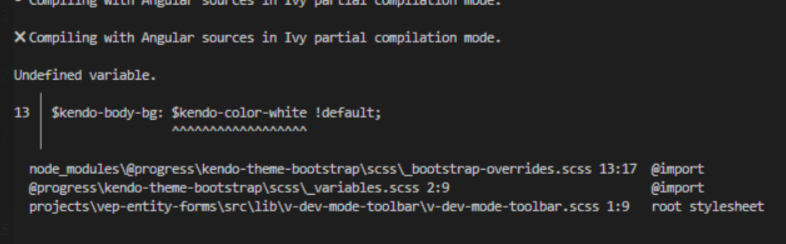
This might be a angular problem that angular should allow building libraries even when scss variables are missing, cause inside the root app we will import all scss which is required to make those things build?
OR
There are some new changes in kendo and we arent aware of them. Is there any tutorial on the docs explaining how to build other libraries and use kendo themes e.g. bootstrap to then overwrite default kendo style?
Please if possible provide detailed informations cause we really don't get futher with this.
OR
Maybe now you have split up that theme library into multiple ones and we need to install a new library and import the scss? However we would still like to maybe just use variables and let the root app provide the scss properly.
When we troubleshoot those things we get several errors, first the variable names are completly missing from the file. However even when we remove those and rename the ones which are renamed its still not working saying that inside _variables.scss kendo requires e.g. (look image below) some undefined variable.
This might be a angular problem that angular should allow building libraries even when scss variables are missing, cause inside the root app we will import all scss which is required to make those things build?
OR
There are some new changes in kendo and we arent aware of them. Is there any tutorial on the docs explaining how to build other libraries and use kendo themes e.g. bootstrap to then overwrite default kendo style?
Please if possible provide detailed informations cause we really don't get futher with this.
OR
Maybe now you have split up that theme library into multiple ones and we need to install a new library and import the scss? However we would still like to maybe just use variables and let the root app provide the scss properly.
Stoyan
Telerik team
answered
on
16 Mar 2023
0 answers
831 views
Hello,
I am generating a template that contains a dynamic button panel, and I need to assign a click event to an <a> element within a dynamically generated <li> list. I get the values from a Json object.
The function value of each element of the list comes from a Json object value (fieldChildren.action), but when trying to assign the event (click)="fieldchildren.action", it is not being created correctly.
Please help me with some indication in this regard.
I am using kendo multistep form with angular 15
<ul ngbDropdownMenu id="addoptions" aria-labelledby="Button_Add" class="dropdown-menu">
<li *ngFor = "let campoChildren of campodisplay.children">
<a class="dropdown-item" (click)="campoChildren.action">{{campoChildren.name}}</a>
</li>
</ul>