or
0 answers
109 views
Dear Supporter,
i tried to use the
@progress/kendo-angular-gauges@4.1.0
in combination with the bootrap theme version
@progress/kendo-theme-bootstrap: 4.36.0
According to your documents, the GaugesModule supportes the theming versions >4.19.
Unfortunately the gauge don´t get colorized, so that it is invisible.
I prepared a StackBlitz demo where you can check its behaviour (stackblitz demo).
If i use the css stylesheet link in the index.html
<link rel="stylesheet" href="https://unpkg.com/@progress/kendo-theme-bootstrap@4.36.0/dist/all.css"/>the gauges are visible.
If i use all.scss
@import "~@progress/kendo-theme-bootstrap/scss/all.scss";
in the styles.scss instead of the link, the gauges dissapear.
I am looking forward to get the gauges working with the theme version 4.36.0 and the .scss stylesheets.
Thank you in advance.
best regards


1 answer
1.2K+ views
Hello, I'm having trouble overriding the grid filter menu.
The issue I'm trying to resolve is combining operators is null + is empty (and is not null + is not empty) - from the user's point of view, there is no difference between value being null or an empty string. For the user it's just blank.
I tried to follow the documentation, to omit the is null/is not null operators, but then all the labels inside the custom string filter popup are completely missing. The other (default) string filter labels are shown as usual. Also - how can I replace the default string filter with my custom filter, so that it affects all the grids in my application?

Martin Bechev
Telerik team

answered
on
15 Mar 2022
1 answer
139 views
Hi! Do you have like this component ? 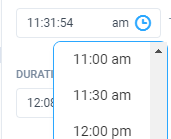

Dimiter Topalov
Telerik team
answered
on
15 Mar 2022
1 answer
369 views
Hi,
I report the behavior of the responsive pager configuration for kendo grid angular for an empty grid (when there is no records data, it display's an empty dropdown). I wonder if is it a bug or a normal behavior ?
Thank you.
1 answer
147 views
Hello guys!
I'm trying to preserve the last width value in the splitter panel's resizer, but the sizeChange event is hitting my endpoint too many times because it's trying to store each of the values that are between the start position and the end position. How can I avoid this? is there a way to get the last value registered in the sizeChange event?
I'm trying to preserve the last width value in the splitter panel's resizer, but the sizeChange event is hitting my endpoint too many times because it's trying to store each of the values that are between the start position and the end position. How can I avoid this? is there a way to get the last value registered in the sizeChange event?

Yanmario
Telerik team
answered
on
14 Mar 2022
0 answers
93 views
When we call Kendorangepicker, it enables 2 input fields - start and end dates. Is it possible to open kendorangepicker from single input field and once the ranges are selected, dates should return to the input field like 01-01-2019 - 20-09-2019.
Thanks,
Abby Ms

yu chiao
Top achievements
 Rank 1
Rank 1
asked
on
14 Mar 2022
0 answers
183 views
How to open and close the detailtemplate programmatically?
I have 3 columns, and therefore 3 cells in which I have a button.
At the click of the button I would like to open / close the detail template
Without having the + icon on the left
<kendo-grid-column field="info" title="info">
     <ng-template kendoGridCellTemplate let-dataItem>
         <button mat-button (click)="clickInfoCell()">
         </button>
      </ng-template>
 </kendo-grid-column>
public onCellClick(event: CellClickEvent){
this.myEvent= event;
}
//toggleTemplate
public clickInfoCell(){
//Close previous template
//Open detail template
}thanks,
Alex

1 answer
110 views
Hi there,
I have an issue using the TreeList component where all the rows are slowly going out alignment with the column headers. I am setting explicit widths on each column. Also this happens regardless of whether I enclose the TreeList in a <div> or not. How can I resolve this issue?
See attached pic for how this looking.
Thanks
Valentin
Telerik team
answered
on
10 Mar 2022
0 answers
246 views
How to get dataitem at doubleClick event on Kendo Grid?
Hi,
<kendo-grid
                                        #myGrid
                                        [data]="gridData"
                                        [selectable]="true"
                                        (selectionChange)="onSelection($event)"
(dblclick)="doubleClickHandler(myGrid, $event)">onSelection(event){
event.selectedRows[0].dataItem
}
doubleClickHandler(grid, event){
//get dataItem like onSelection function
}
1 answer
230 views
Hi all!
I want to create a area chart with dash-line fill. (mistake in header)
I use <kendo-chart-series> + <kendo-chart-series-item>
I've tried to use color and dash Type fields, but that doesn't work
May you help me with that? Big thanks!
What i want: https://prnt.sc/kU8pjFzvfyxF
What i have: https://prnt.sc/5hK7TeXQR12r
Martin Bechev
Telerik team
answered
on
10 Mar 2022











